Standardised – yet flexible
The report has a defined structure, but automatically adapts to the respective project:
- Automatic language selection (German/English depending on browser settings)
- Customised branding with project title and author
- Dynamic tables depending on the number of area categories and sources
This results in a consistent, professional document that nevertheless remains project-specific.
Page 1: The essence of the assessment
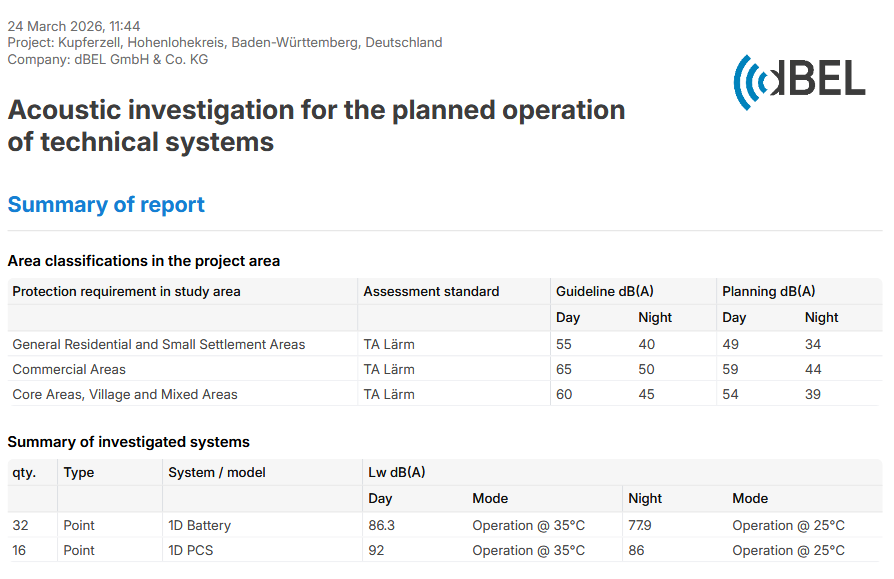
The first page is deliberately designed to stand on its own. It answers three key questions:
1. Which requirements apply?
The basis of every assessment is the applicable evaluation regulation and the area classification. dBEL supports up to three area categories per project. Depicted are:
- Reference values in accordance with the regulation
- Planning targets (day/night)
- Individual target values (where applicable)
Why planning targets? Because a single technical installation is generally not permitted to fully utilise the statutory reference value. This applies to the total of all contributing sources. The planning target therefore reflects the realistic project scope.
2. What was assessed?
The report transparently documents:
- Type and number of the installations assessed
- Relevant noise sources
- Existing noise reduction measures (where applicable)
As dBEL supports up to 100 noise sources, an intelligent presentation is applied: manageable projects are described directly on page 1, while more complex projects refer to structured appendix pages. Noise protection measures such as noise barriers are also clearly identified and explained in detail where required.
3. What is the result?
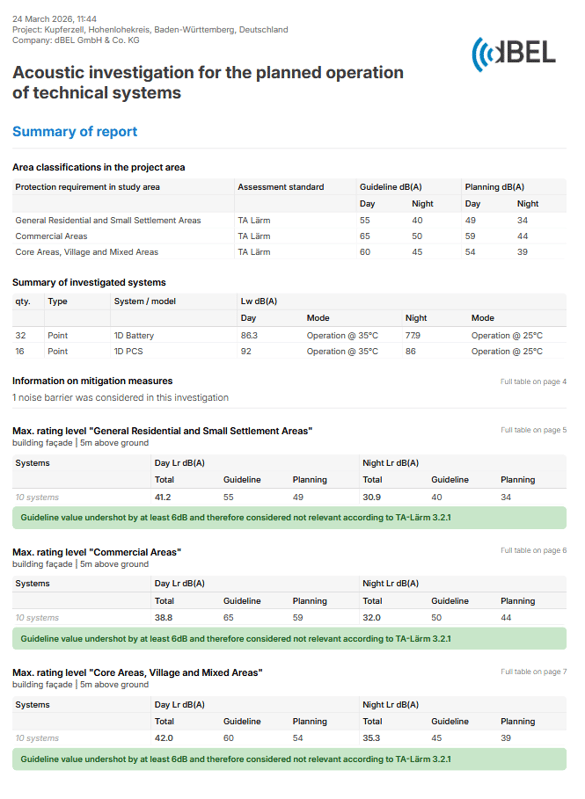
The focus is on the maximum assessment levels at the most critical calculation points. The following information is displayed for each area category:
- Assessment levels (day/night)
- Reference value
- Planning target
- Brief assessment
In addition, a colour-coded classification is provided:
🟢 Planning target met
🟡 Intermediate range – coordination recommended
🔴 Reference value exceeded
This makes it clear at a glance whether action is required.
Page 2 & 3: Results in spatial context
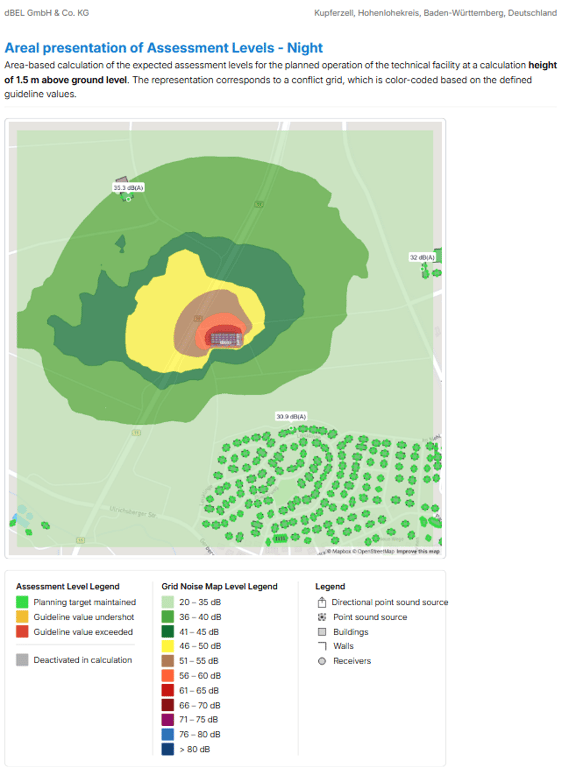
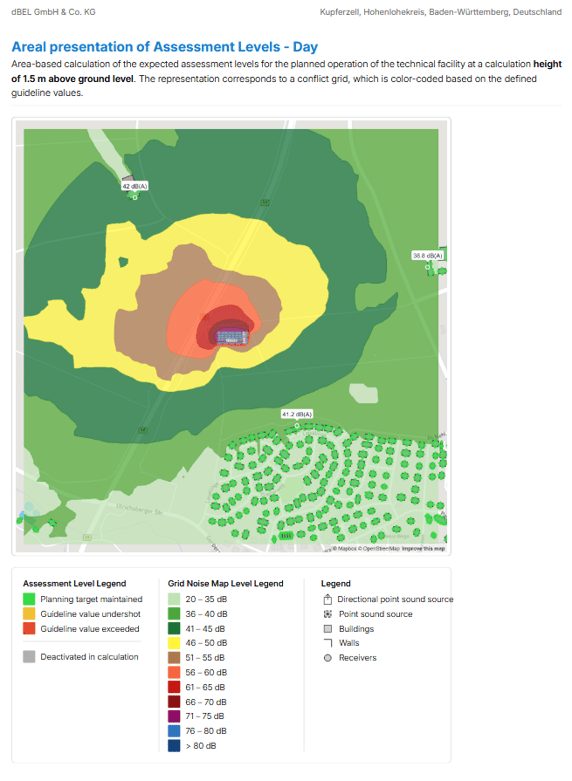
Page 2 and page 3 present the spatial classification of the results. Depicted are:
- The distribution of noise levels within the project area
- Buildings with colour-coded assessment
- The highlighted most critical calculation points
At the highlighted points, the respective assessment level is displayed directly. This creates a clear link between results in the table and the specific locations on site. The visualisation provides transparency and traceability, particularly in discussions with authorities or project partners.
Page 4: The calculation model
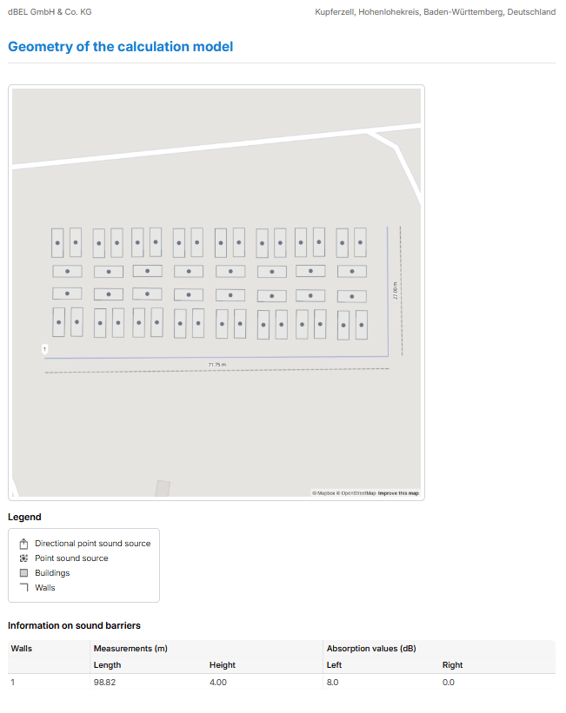
Page 4 shows the basis of the entire assessment: the modelled installation concept. All technical installations assessed are visualised in the geo-model:
- Individual installations clearly focused and precisely positioned
- Complex projects represented in their full installation scope
Existing noise protection barriers are also visible. An important aspect is the distinction between different types of noise sources:
- Point sources
- Structure-borne noise sources
Even in the top view, the type and dimensions are clearly identifiable. This allows the modelling to be quickly checked for plausibility. This page demonstrates that the results are based on a clearly defined and traceable model.
Dynamic detail pages: Where does the level originate?
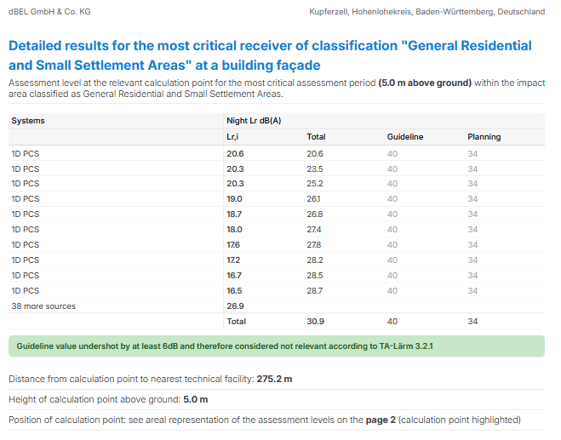
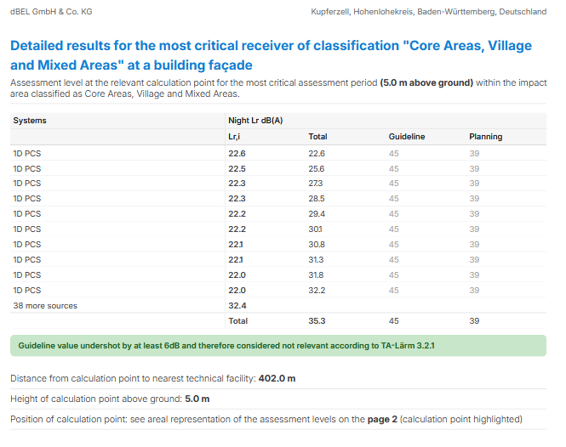
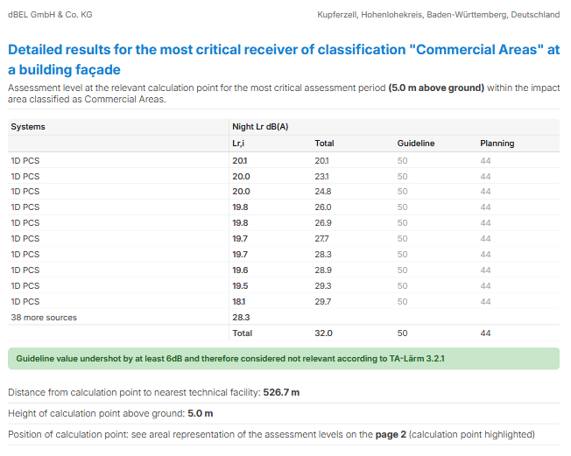
For the most critical calculation points, dBEL automatically generates detail pages – a maximum of three, corresponding to the area categories. Here, the assessment level is broken down into its individual components:
- The ten loudest noise sources
- Their respective individual contribution (Lr,i)
- The energetic summation to the overall level
The loudest source is listed at the top – immediately indicating where optimisation would be most effective. All remaining sources (beyond the top 10) are presented in aggregated form, including their cumulative residual contribution.
Optimisation directly within the application
This analysis is not only available in the report. In the dBEL interface, users can:
- Select the most critical calculation point
- Display the relevant noise sources
- Jump directly to the respective source in the model
This significantly facilitates targeted optimisation, particularly in projects with many similarly named installations.
Plausibility check
The detail pages also include:
- Distance from the calculation point to the nearest installation
- Height of the calculation point above ground level
By default, dBEL places calculation points at half the building height. In certain cases – for example, for sources close to the ground – an adjustment may be appropriate (e.g. 2 m above ground level). These parameters enable a quick technical plausibility check.
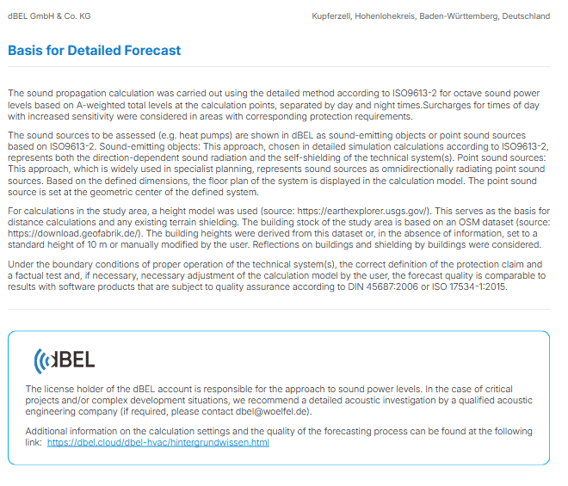
Methodological basis
The final page transparently documents:
- Applied standards and propagation models
- The distinction between point sources and structure-borne noise sources
- The origin of the geodata used
A link provides access to more detailed background information on the dBEL.Cloud website.
Conclusion
The dBEL report combines:
- A concise summary
- Spatial visualisation
- Transparent representation of the model
- Detailed root cause analysis
- Standard-compliant methodological classification
It does not replace a formal noise immission report – but it provides clarity at an early stage, reduces planning risks and enables well-founded decisions. It is the communicative core of every dBEL project.
